- All products
- Attachment Control for Odoo - WebDAV Connector
- All products


Attachment Control - WebDAV
Add WebDAV as a storage backend for Attachment Control so routing, audit, move, storage archive and restore workflows can work with WebDAV-compatible servers through credential-based access.
What this connector adds
- WebDAV provider in Storage Credentials: create credentials for WebDAV servers and compatible services.
- Credential-based backend usage: the core module can use WebDAV in routing, audit, move, storage archive and restore flows.
- Generic backend operations: read, write, delete, list and connection test through the common backend API.
- Provider isolation: WebDAV-specific communication stays outside the core module.
No data is sent to the developer. Data is sent only to the WebDAV service explicitly configured by the user.
Compatibility
- On-premise: supported.
- Odoo.sh: generally supported if the target WebDAV service is reachable from the runtime environment.
- Odoo Online: not recommended because external endpoint configuration and runtime network behavior may be restricted.
Requirements
- Install the core module Attachment Control.
- Install this connector module
attachment_storage_manager_webdav. - Prepare a reachable WebDAV endpoint with valid credentials and write permissions.
- Restart Odoo if needed by your deployment process.
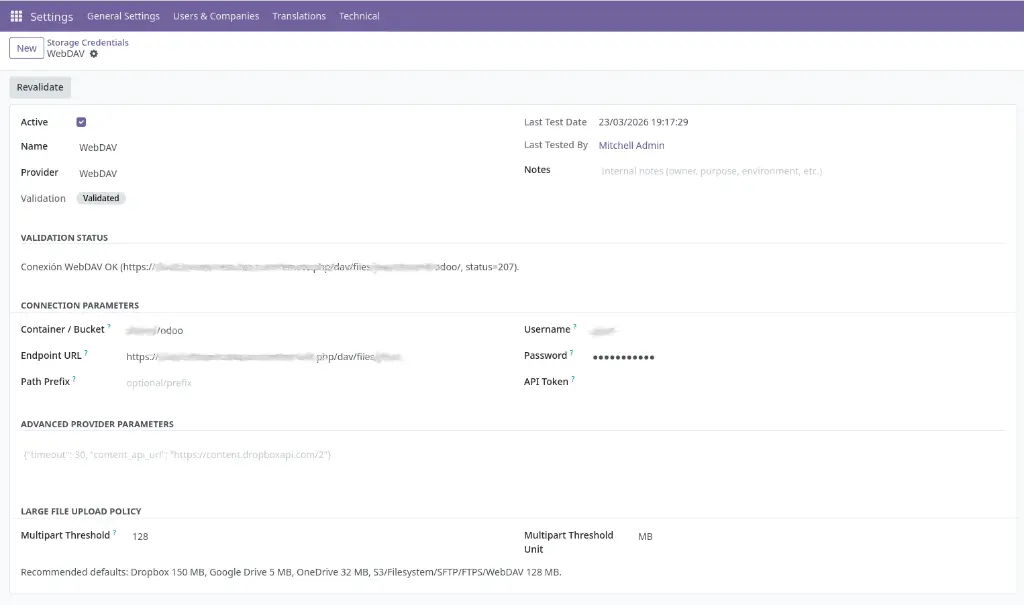
Credential fields
How it is used
Operational notes
- The remote WebDAV path must already exist and be writable before running move, storage or restore operations.
- Server behavior may differ depending on redirects, authentication mode and folder handling. Always validate with the test button.
- Use HTTPS endpoints in production environments.
- For long-running jobs, configure
limit_time_real_cron = 3600inodoo.conf.
Operational safety
Attachment Control - WebDAV
Add WebDAV as a storage backend for Attachment Control so routing, audit, move, storage archive and restore workflows can work with WebDAV-compatible servers through credential-based access.
What this connector adds
- WebDAV provider in Storage Credentials: create credentials for WebDAV servers and compatible services.
- Credential-based backend usage: the core module can use WebDAV in routing, audit, move, storage archive and restore flows.
- Generic backend operations: read, write, delete, list and connection test through the common backend API.
- Provider isolation: WebDAV-specific communication stays outside the core module.
No data is sent to the developer. Data is sent only to the WebDAV service explicitly configured by the user.
Compatibility
- On-premise: supported.
- Odoo.sh: generally supported if the target WebDAV service is reachable from the runtime environment.
- Odoo Online: not recommended because external endpoint configuration and runtime network behavior may be restricted.
Requirements
- Install the core module Attachment Control.
- Install this connector module
attachment_storage_manager_webdav. - Prepare a reachable WebDAV endpoint with valid credentials and write permissions.
- Restart Odoo if needed by your deployment process.
Credential fields
How it is used
Operational notes
- The remote WebDAV path must already exist and be writable before running move, storage or restore operations.
- Server behavior may differ depending on redirects, authentication mode and folder handling. Always validate with the test button.
- Use HTTPS endpoints in production environments.
- For long-running jobs, configure
limit_time_real_cron = 3600inodoo.conf.
Operational safety
Attachment Control - WebDAV
Añade WebDAV como backend de almacenamiento para Attachment Control para que los flujos de routing, audit, move, storage archive y restore puedan trabajar con servidores compatibles con WebDAV mediante acceso basado en credenciales.
Qué añade este conector
- Proveedor WebDAV en Storage Credentials: crea credenciales para servidores WebDAV y servicios compatibles.
- Uso de backend basado en credenciales: el módulo core puede usar WebDAV en los flujos de routing, audit, move, storage archive y restore.
- Operaciones backend genéricas: lectura, escritura, borrado, listado y prueba de conexión mediante la API backend común.
- Aislamiento del proveedor: la comunicación específica de WebDAV permanece fuera del módulo core.
No se envía ningún dato al desarrollador. Los datos se envían únicamente al servicio WebDAV configurado explícitamente por el usuario.
Compatibilidad
- On-premise: soportado.
- Odoo.sh: generalmente soportado si el servicio WebDAV destino es alcanzable desde el entorno runtime.
- Odoo Online: no recomendado porque la configuración de endpoints externos y el comportamiento de red del runtime pueden estar restringidos.
Requisitos
- Instala el módulo core Attachment Control.
- Instala este módulo conector
attachment_storage_manager_webdav. - Prepara un endpoint WebDAV alcanzable con credenciales válidas y permisos de escritura.
- Reinicia Odoo si tu despliegue lo requiere.
Campos de la credencial
Cómo se utiliza
Notas operativas
- La ruta WebDAV remota debe existir previamente y ser escribible antes de ejecutar moves, storages o restores.
- El comportamiento del servidor puede variar según redirecciones, modo de autenticación y gestión de carpetas. Valida siempre con el botón de prueba.
- Usa endpoints HTTPS en entornos de producción.
- Para jobs de larga duración, configura
limit_time_real_cron = 3600enodoo.conf.
Seguridad operativa
Attachment Control - WebDAV
Añade WebDAV como backend de almacenamiento para Attachment Control para que los flujos de routing, audit, move, storage archive y restore puedan trabajar con servidores compatibles con WebDAV mediante acceso basado en credenciales.
Qué añade este conector
- Proveedor WebDAV en Storage Credentials: crea credenciales para servidores WebDAV y servicios compatibles.
- Uso de backend basado en credenciales: el módulo core puede usar WebDAV en los flujos de routing, audit, move, storage archive y restore.
- Operaciones backend genéricas: lectura, escritura, borrado, listado y prueba de conexión mediante la API backend común.
- Aislamiento del proveedor: la comunicación específica de WebDAV permanece fuera del módulo core.
No se envía ningún dato al desarrollador. Los datos se envían únicamente al servicio WebDAV configurado explícitamente por el usuario.
Compatibilidad
- On-premise: soportado.
- Odoo.sh: generalmente soportado si el servicio WebDAV destino es alcanzable desde el entorno runtime.
- Odoo Online: no recomendado porque la configuración de endpoints externos y el comportamiento de red del runtime pueden estar restringidos.
Requisitos
- Instala el módulo core Attachment Control.
- Instala este módulo conector
attachment_storage_manager_webdav. - Prepara un endpoint WebDAV alcanzable con credenciales válidas y permisos de escritura.
- Reinicia Odoo si tu despliegue lo requiere.
Campos de la credencial
Cómo se utiliza
Notas operativas
- La ruta WebDAV remota debe existir previamente y ser escribible antes de ejecutar moves, storages o restores.
- El comportamiento del servidor puede variar según redirecciones, modo de autenticación y gestión de carpetas. Valida siempre con el botón de prueba.
- Usa endpoints HTTPS en entornos de producción.
- Para jobs de larga duración, configura
limit_time_real_cron = 3600enodoo.conf.
Seguridad operativa
Specifications
| Version | 17.0, 18.0, 19.0 |