- Todos los productos
- Control y organización de adjuntos en Odoo - Conector Dropbox
?unique=43b412c)
?unique=43b412c)
Control y organización de adjuntos en Odoo - Conector Dropbox
https://spre.es/shop/control-y-organizacion-de-adjuntos-en-odoo-conector-dropbox-75 https://spre.es/web/image/product.template/75/image_1920?unique=43b412cAttachment Control - Dropbox
Add Dropbox as a storage backend for Attachment Control so routing, audit, move, storage archive and restore workflows can work with Dropbox through OAuth credentials.
What this connector adds
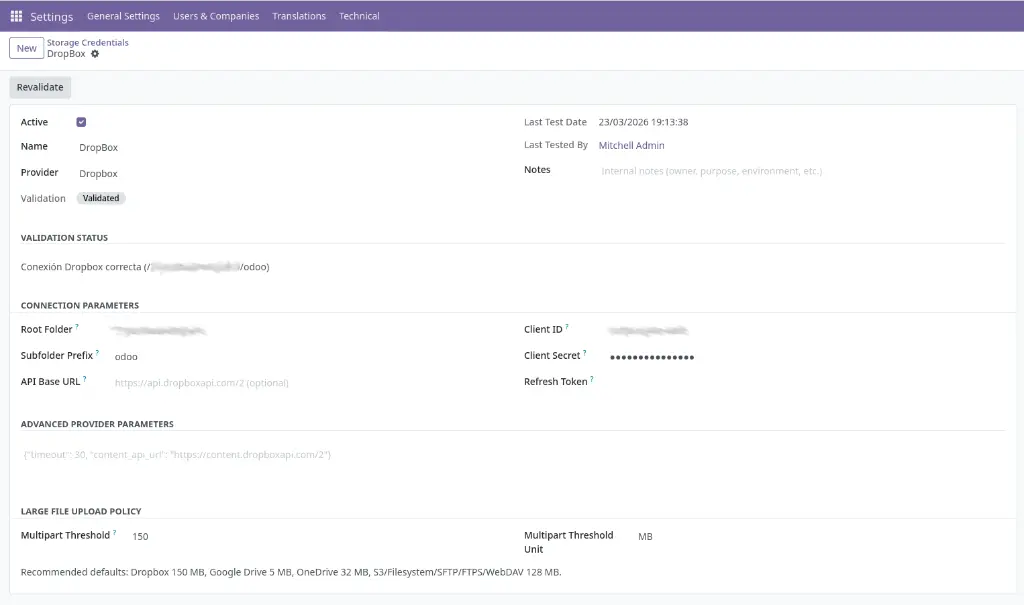
- Dropbox provider in Storage Credentials: create credentials connected to a Dropbox app.
- Credential-based backend usage: the core module can use this provider in routing, move, storage archive and restore flows.
- OAuth integration: the credential can obtain and refresh tokens through Dropbox OAuth.
- Provider isolation: Dropbox-specific logic stays outside the core module.
No data is sent to the developer. Data is sent only to Dropbox after explicit user configuration.
Compatibility
- On-premise: supported.
- Odoo.sh: supported.
- Odoo Online: not recommended for this connector because OAuth routes and external endpoint behavior depend on environment constraints that are not under module control.
Credential mapping
OAuth flow
https://<your-domain>/attachment_storage_manager_dropbox/oauth/callback.How it is used
Operational notes
- web.base.url must be correctly configured for OAuth redirects.
- If you are behind a reverse proxy, enable proxy_mode and pass the HTTPS scheme correctly.
- Always test the credential before production use.
- For long-running jobs, configure
limit_time_real_cron = 3600inodoo.conf.
Operational safety
Attachment Control - Dropbox
Add Dropbox as a storage backend for Attachment Control so routing, audit, move, storage archive and restore workflows can work with Dropbox through OAuth credentials.
What this connector adds
- Dropbox provider in Storage Credentials: create credentials connected to a Dropbox app.
- Credential-based backend usage: the core module can use this provider in routing, move, storage archive and restore flows.
- OAuth integration: the credential can obtain and refresh tokens through Dropbox OAuth.
- Provider isolation: Dropbox-specific logic stays outside the core module.
No data is sent to the developer. Data is sent only to Dropbox after explicit user configuration.
Compatibility
- On-premise: supported.
- Odoo.sh: supported.
- Odoo Online: not recommended for this connector because OAuth routes and external endpoint behavior depend on environment constraints that are not under module control.
Credential mapping
OAuth flow
https://<your-domain>/attachment_storage_manager_dropbox/oauth/callback.How it is used
Operational notes
- web.base.url must be correctly configured for OAuth redirects.
- If you are behind a reverse proxy, enable proxy_mode and pass the HTTPS scheme correctly.
- Always test the credential before production use.
- For long-running jobs, configure
limit_time_real_cron = 3600inodoo.conf.
Operational safety
Attachment Control - Dropbox
Añade Dropbox como backend de almacenamiento para Attachment Control para que los flujos de routing, audit, move, storage archive y restore puedan trabajar con Dropbox mediante credenciales OAuth.
Qué añade este conector
- Proveedor Dropbox en Storage Credentials: crea credenciales conectadas a una app de Dropbox.
- Uso de backend basado en credenciales: el módulo core puede usar este proveedor en los flujos de routing, move, storage archive y restore.
- Integración OAuth: la credencial puede obtener y renovar tokens mediante Dropbox OAuth.
- Aislamiento del proveedor: la lógica específica de Dropbox permanece fuera del módulo core.
No se envía ningún dato al desarrollador. Los datos se envían a Dropbox solo tras la configuración explícita del usuario.
Compatibilidad
- On-premise: soportado.
- Odoo.sh: soportado.
- Odoo Online: no recomendado para este conector porque las rutas OAuth y el comportamiento de endpoints externos dependen de restricciones del entorno que no están bajo control del módulo.
Mapeo de credenciales
Flujo OAuth
https://<tu-dominio>/attachment_storage_manager_dropbox/oauth/callback.Cómo se utiliza
Notas operativas
- web.base.url debe estar correctamente configurado para las redirecciones OAuth.
- Si estás detrás de un proxy inverso, activa proxy_mode y pasa correctamente el esquema HTTPS.
- Prueba siempre la credencial antes del uso en producción.
- Para jobs de larga duración, configura
limit_time_real_cron = 3600enodoo.conf.
Seguridad operativa
Attachment Control - Dropbox
Añade Dropbox como backend de almacenamiento para Attachment Control para que los flujos de routing, audit, move, storage archive y restore puedan trabajar con Dropbox mediante credenciales OAuth.
Qué añade este conector
- Proveedor Dropbox en Storage Credentials: crea credenciales conectadas a una app de Dropbox.
- Uso de backend basado en credenciales: el módulo core puede usar este proveedor en los flujos de routing, move, storage archive y restore.
- Integración OAuth: la credencial puede obtener y renovar tokens mediante Dropbox OAuth.
- Aislamiento del proveedor: la lógica específica de Dropbox permanece fuera del módulo core.
No se envía ningún dato al desarrollador. Los datos se envían a Dropbox solo tras la configuración explícita del usuario.
Compatibilidad
- On-premise: soportado.
- Odoo.sh: soportado.
- Odoo Online: no recomendado para este conector porque las rutas OAuth y el comportamiento de endpoints externos dependen de restricciones del entorno que no están bajo control del módulo.
Mapeo de credenciales
Flujo OAuth
https://<tu-dominio>/attachment_storage_manager_dropbox/oauth/callback.Cómo se utiliza
Notas operativas
- web.base.url debe estar correctamente configurado para las redirecciones OAuth.
- Si estás detrás de un proxy inverso, activa proxy_mode y pasa correctamente el esquema HTTPS.
- Prueba siempre la credencial antes del uso en producción.
- Para jobs de larga duración, configura
limit_time_real_cron = 3600enodoo.conf.